
Notice
Recent Posts
Recent Comments
Link
250x250
| 일 | 월 | 화 | 수 | 목 | 금 | 토 |
|---|---|---|---|---|---|---|
| 1 | 2 | 3 | 4 | 5 | 6 | 7 |
| 8 | 9 | 10 | 11 | 12 | 13 | 14 |
| 15 | 16 | 17 | 18 | 19 | 20 | 21 |
| 22 | 23 | 24 | 25 | 26 | 27 | 28 |
Tags
- CS/자료구조/Linked_List
- CS/자료구조/Priority_Queue
- Tree/Traversal
- CS/자료구조/Doubly_Linked_List
- Tree/AVL
- 코드엔진
- CS/자료구조/Singly_Linked_List
- CS/자료구조/Stack
- CS/자료구조/Circular_Linked_List
- Tree/Binary_Search_Tree
- 리버싱
- Tree/Binary_Tree
- Tree/AVL/Deletion
- Tree/RBTree
- ctf
- CS/자료구조/Queue
- CS/자료구조/Circular_Queue
- Tree/AVL/Insertion
- tree
- reversing
- UTCTF
- Tree/RBTree/Deletion
- codeengn
- Tree/RBTree/Insertion
- Tree/BST
- forensic
Archives
- Today
- Total
SuperVingo
CodeEngn.com Basic RCE L13 WriteUp 본문
728x90
0. 실행화면
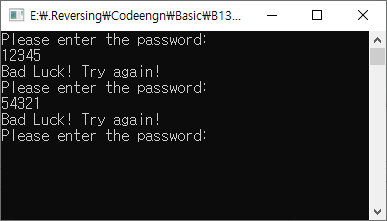
여러번 입력을 받고, 특정 password를 입력해야하는 것 같다.
1. ExeInfoPE 분석
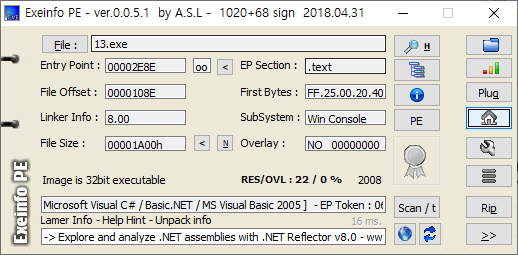
C#으로 제작된 프로그램이다. C#의 경우에는 Decompiler가 많아서 바로 소스코드를 볼 수 있는 경우가 많다. 이번 문제는 본인이 자주 쓰는 툴인 dnSpy를 통해서 분석하겠다.
2. dnSpy 분석
dnSpy를 통해서 RijndaelSimpleTest라는 클래스를 찾았고, 이 안에서 암호화와 복호화 함수들을 모두 볼 수 있었다.
public class RijndaelSimple
{
	public static string Encrypt(string plainText, string passPhrase, string saltValue, string hashAlgorithm, int passwordIterations, string initVector, int keySize)
	{
		byte[] bytes = Encoding.ASCII.GetBytes(initVector);
		byte[] bytes2 = Encoding.ASCII.GetBytes(saltValue);
		byte[] bytes3 = Encoding.UTF8.GetBytes(plainText);
		PasswordDeriveBytes passwordDeriveBytes = new PasswordDeriveBytes(passPhrase, bytes2, hashAlgorithm, passwordIterations);
		byte[] bytes4 = passwordDeriveBytes.GetBytes(keySize / 8);
		ICryptoTransform transform = new RijndaelManaged
		{
			Mode = CipherMode.CBC
		}.CreateEncryptor(bytes4, bytes);
		MemoryStream memoryStream = new MemoryStream();
		CryptoStream cryptoStream = new CryptoStream(memoryStream, transform, CryptoStreamMode.Write);
		cryptoStream.Write(bytes3, 0, bytes3.Length);
		cryptoStream.FlushFinalBlock();
		byte[] inArray = memoryStream.ToArray();
		memoryStream.Close();
		cryptoStream.Close();
		return Convert.ToBase64String(inArray);
	}

	public static string Decrypt(string cipherText, string passPhrase, string saltValue, string hashAlgorithm, int passwordIterations, string initVector, int keySize)
	{
		byte[] bytes = Encoding.ASCII.GetBytes(initVector);
		byte[] bytes2 = Encoding.ASCII.GetBytes(saltValue);
		byte[] array = Convert.FromBase64String(cipherText);
		PasswordDeriveBytes passwordDeriveBytes = new PasswordDeriveBytes(passPhrase, bytes2, hashAlgorithm, passwordIterations);
		byte[] bytes3 = passwordDeriveBytes.GetBytes(keySize / 8);
		ICryptoTransform transform = new RijndaelManaged
		{
			Mode = CipherMode.CBC
		}.CreateDecryptor(bytes3, bytes);
		MemoryStream memoryStream = new MemoryStream(array);
		CryptoStream cryptoStream = new CryptoStream(memoryStream, transform, CryptoStreamMode.Read);
		byte[] array2 = new byte[array.Length];
		int count = cryptoStream.Read(array2, 0, array2.Length);
		memoryStream.Close();
		cryptoStream.Close();
		return Encoding.UTF8.GetString(array2, 0, count);
	}

    private static void Main(string[] args)
	{
		string text = "";
		string cipherText = "BnCxGiN4aJDE+qUe2yIm8Q==";
		string passPhrase = "^F79ejk56$£";
		string saltValue = "DHj47&*)$h";
		string hashAlgorithm = "MD5";
		int passwordIterations = 1024;
		string initVector = "&!£$%^&*()CvHgE!";
		int keySize = 256;
		RijndaelSimple.Encrypt(text, passPhrase, saltValue, hashAlgorithm, passwordIterations, initVector, keySize);
		text = RijndaelSimple.Decrypt(cipherText, passPhrase, saltValue, hashAlgorithm, passwordIterations, initVector, keySize);
		for (;;)
		{
			Console.WriteLine("Please enter the password: ");
			string a = Console.ReadLine();
			if (a == text)
			{
				break;
			}
			Console.WriteLine("Bad Luck! Try again!");
		}
		Console.WriteLine("Well Done! You cracked it!");
		Console.ReadLine();
	}
}
계속해서 보니, string a라는 변수에 입력을 받고, 이를 text랑 비교한다. 우리는 text를 얻어내기만 하면된다. 새로운 프로젝트를 만들어 위 소스코드를 그대로 실행하고, text를 출력하도록 했다.
Console.WriteLine(text);중간에 써주고, 실행해보니
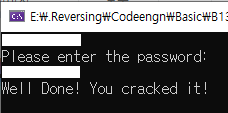
text가 출력되었고, 이를 입력하니 성공 문자열을 확인 할 수 있었다.
728x90
'Wargame[워게임] > CodeEngn' 카테고리의 다른 글
| CodeEngn.com Basic RCE L15 WriteUp (0) | 2020.07.30 |
|---|---|
| CodeEngn.com Basic RCE L14 WriteUp (0) | 2020.07.29 |
| CodeEngn.com Basic RCE L12 WriteUp (0) | 2020.07.29 |
| CodeEngn.com Basic RCE L11 WriteUp (0) | 2020.07.29 |
| CodeEngn.com Basic RCE L10 WriteUp (0) | 2020.07.29 |
'Wargame[워게임]/CodeEngn' Related Articles
more


